16M 小闪存(Flash)MT7621A 芯片路由器安装 sing-box 透明代理
老型号低配置路由器安装使用科学上网翻墙插件

路由器型号
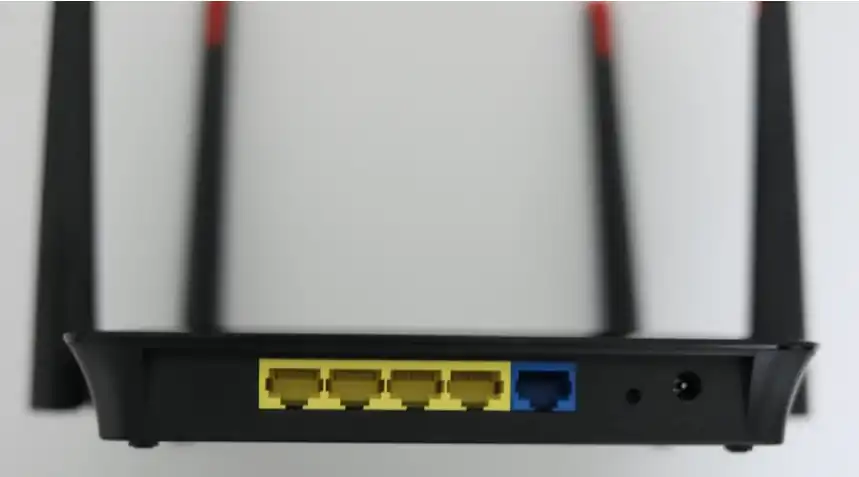
手上有一台外贸公司淘汰下来的 TANTIV4 NSAC1200RZ Netsmart Router,路由器背面只有打印的 “外贸千兆路由器” 字样;一个千兆 wan 口,4个百兆 lan 口,并不是说芯片不支持,而是每个 lan 口只有 4 条接线。与此路由器类似配置的还有华硕 RT-AC1200GU(RT-AC57U),Zbtlink ZBT-WG1602 16M 路由器和友华 YouHua WR1200JS;
这几个路由器芯片都是一样的,TANTIV4 可以刷这几个路由器的 OpenWRT 固件,但是由于电路设计的不同,刷了之后会出现不同的问题。TANTIV4 刷入华硕 RT-AC1200GU 的固件后,Wi-Fi 灯不亮,其他正常; 刷入 Zbtlink ZBT-WG1602 16M 版的固件,网口顺序不对但是可以在后台调整网口,算是将就可用;刷入友华 YouHua WR1200JS 的固件一切正常,唯一区别就是 YouHua WR1200JS 有 USB 口,而这台 TANTIV4 没有 USB 口,拆开看电路板其实是预留了一个 USB 接口的焊盘位置,也许是为了省成本所以没装 USB 模块。

这台 TANTIV4 路由器到我手里就已经刷好了 Breed,所以可以很方便刷各种固件,不担心变砖;需要注意的是,刷机 RESET 按钮不是位于路由器前方,这台路由器设计很奇怪,如果说天线的位置算后边的话,它的网口,电源接口都在前边,电源接口旁边还有个和 RESET 按钮一样的孔,刷好友华 YouHua WR1200JS 的固件后,这个按钮是重置功能,刷机 RESET 按钮位于左边的散热孔里。
懒人版自带插件的 OpenWRT 衍生版: Kwrt
如果当前是基于快照版的,可以去历史版本下载稳定版分支,截至本文发表之前最新版为 分支: 25.12.5;如果有最新的稳定版分支,直接下载 07.02-YOUHUA_WR1200JS-SQUASHFS-SYSUPGRADE.BIN 这样的文件即可。
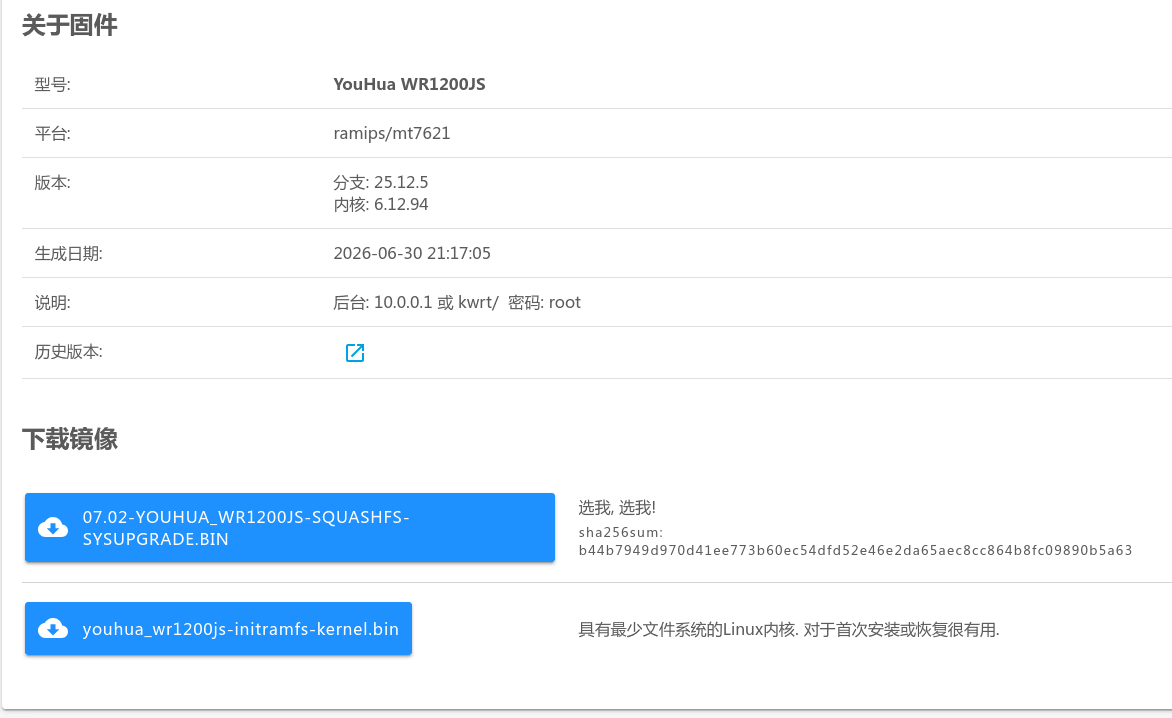
Kwrt 默认自带 PassWall 插件,但是对于 TANTIV4 这样的配置来说可以用但是很慢,尤其是订阅管理和规则管理页面卡个十几秒都很正常。之前这台路由器跑的是 shadowsocks 协议,用 PassWall 插件跑 Anytls 和 Tuic 协议就有点吃力了,也就是说如果你有这样的路由器,可以旧物再利用。至于要不要购置新路由器就看你的选择了。
进阶版官方 OpenWRT 跑 sing-box 裸核代理
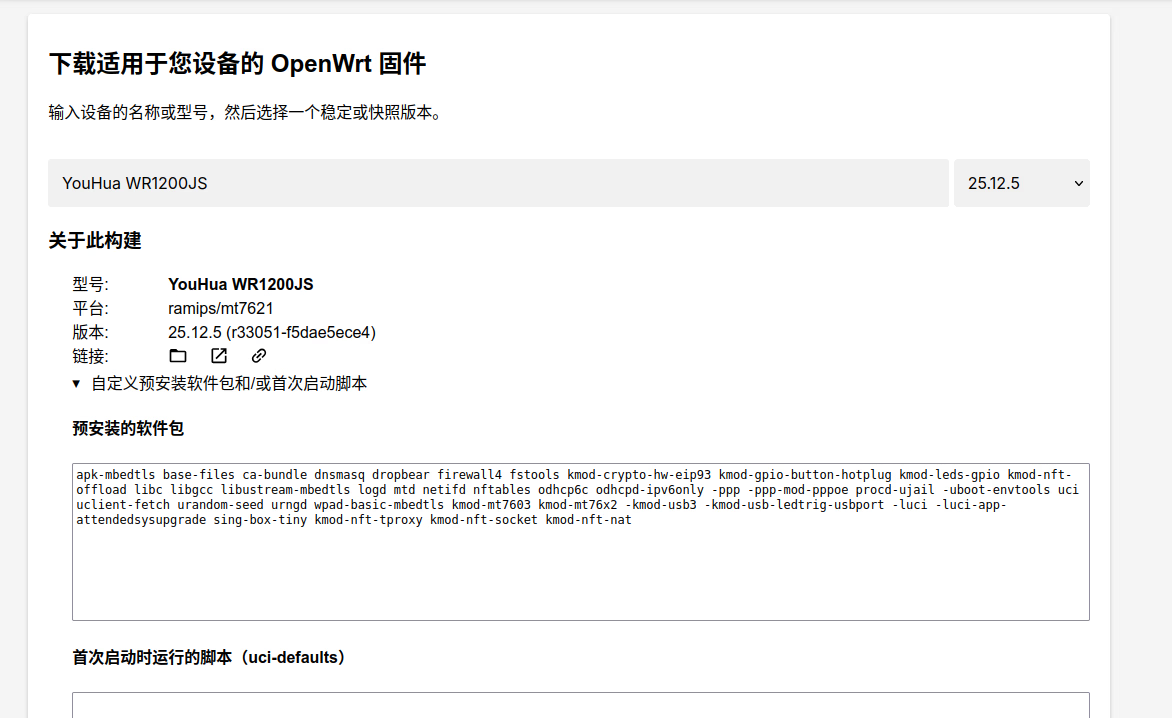
打开 OpenWrt Firmware Selector,输入 YouHua WR1200JS,不要直接下载映像;点开“自定义预安装软件包和/或首次启动脚本”,预安装的软件包填入以下内容。
1
apk-mbedtls base-files ca-bundle dnsmasq dropbear firewall4 fstools kmod-crypto-hw-eip93 kmod-gpio-button-hotplug kmod-leds-gpio kmod-nft-offload libc libgcc libustream-mbedtls logd mtd netifd nftables odhcp6c odhcpd-ipv6only -ppp -ppp-mod-pppoe procd-ujail -uboot-envtools uci uclient-fetch urandom-seed urngd wpad-basic-mbedtls kmod-mt7603 kmod-mt76x2 -kmod-usb3 -kmod-usb-ledtrig-usbport -luci -luci-app-attendedsysupgrade -luci-base -uhttpd sing-box-tiny -rpcd-mod-luci
然后点击“请求构建”,在线构建可以把 sing-box-tiny 写进只读压缩分区,有足够的空间下载规则文件;同时删除了 luci 界面包,pppoe 拨号相关包(这个配置就不要想光猫桥接了),USB 模块包,留着 luci 界面包也是可以的,会多占用大概 500kb 的空间。无 luci 界面配置路由器参考这篇文章 OpenWRT 25.12 命令行完整配置指南。
也可以去我的 Dropbox 网盘下载编译好的固件,OpenWrt 官方在线编译,只自定义预安装软件包,不做其他任何修改;名字中 1.12.17 和 1.13.18 为对应的 sing-box-tiny 版本。
youhua_wr1200js-openwrt-singbox
为什么要使用在线构建可以把 sing-box-tiny 写进只读压缩分区?直接下载原版映像,空间不够安装 sing-box 包,更没有空间下载额外的规则文件。
sing-box 配置科学上网代理
ssh 进路由器后台,编辑 sing-box 配置文件。
1
vi /etc/sing-box/config.json
复制粘贴以下内容。(以下配置适用于 1.13.18,sing-box 1.13 已经到达了 16m 闪存路由器的极限,1.14 版本膨胀太多,只适用于闪存大于 32m 的路由器)
1
2
3
4
5
6
7
8
9
10
11
12
13
14
15
16
17
18
19
20
21
22
23
24
25
26
27
28
29
30
31
32
33
34
35
36
37
38
39
40
41
42
43
44
45
46
47
48
49
50
51
52
53
54
55
56
57
58
59
60
61
62
63
64
65
66
67
68
69
70
71
72
73
74
75
76
77
78
79
80
81
82
83
84
85
86
87
88
89
90
91
92
93
94
95
96
97
98
99
100
101
102
103
104
105
106
107
108
109
110
111
112
113
114
115
116
117
118
119
120
121
122
123
124
125
126
127
128
129
130
131
132
133
134
135
136
137
138
139
140
141
142
143
144
145
146
147
148
149
150
151
152
153
154
155
156
157
158
159
160
161
162
163
164
165
166
167
168
169
170
171
172
173
174
175
176
177
178
179
180
181
182
183
184
185
186
187
188
189
190
191
192
193
194
195
196
197
198
199
200
201
202
203
204
205
206
207
208
209
210
211
212
213
214
215
216
217
218
219
220
221
222
223
224
225
226
227
228
229
230
231
232
233
234
235
236
237
238
239
240
241
242
243
244
245
246
247
248
249
250
251
252
253
254
255
256
257
258
259
260
261
262
263
264
265
266
267
268
269
270
271
272
273
274
275
276
277
278
279
280
281
282
283
{
  "log": {
    "disabled": true,
    "level": "info",
    "timestamp": false
  },
  "dns": {
    "servers": [
      {
        "tag": "dns-direct",
        "type": "udp",
        "server": "192.168.1.1",
        "server_port": 53
      },
      {
        "type": "h3",
        "tag": "dns-remote",
        "server": "1.1.1.1",
        "server_port": 443,
        "path": "/dns-query",
        "detour": "proxy"
      }
    ],
    "reverse_mapping": false,
    "rules": [
      {
        "domain_suffix": [
          "addons.mozilla.org",
          "analytics.google.com",
          "onedrive.live.com",
          "primevideo.com",
          "steamcommunity.com",
          "tpc.googlesyndication.com"
        ],
        "server": "dns-remote"
      },
      {
        "domain_suffix": [
          "accuweather.com",
          "aviationweather.gov",
          "edu.kg",
          "google.cn",
          "hdcdn.online",
          "localsend.org",
          "made-in-china.com",
          "micstatic.com",
          "meixi-mgo.com",
          "met.no",
          "openweathermap.org",
          "rustdesk.com",
          "tigress.cc",
          "vis.ee",
          "xzmgo.com",
          "bjxuejing.cn",
          "wanyiwan.top"
        ],
        "server": "dns-direct"
      },
      {
        "rule_set": ["geosite-category-ads"],
        "action": "reject"
      },
      {
        "domain_keyword": [
          "gdtimg",
          "pangolin",
          "pglstatp"
        ],
        "action": "reject"
      },
      {
        "domain_suffix": [
          "ad.10010.com",
          "ads.cup.com.cn",
          "boot.biz.weibo.com",
          "bootpreload.uve.weibo.com",
          "bootrealtime.uve.weibo.com",
          "brandvideo.biz.weibo.com",
          "dsp-ad.yy.com",
          "e.qq.com",
          "gdt.qq.com",
          "splash.yy.com"
        ],
        "action": "reject"
      },
      {
        "rule_set": [
          "geosite-google-cn"
        ],
        "server": "dns-direct"
      },
      {
        "rule_set": [
          "geosite-github",
          "geosite-google",
          "geosite-linkedin",
          "geosite-meta",
          "geosite-tiktok"
        ],
        "server": "dns-remote"
      },
      {
        "rule_set": [
          "geosite-amazon",
          "geosite-microsoft",
          "geosite-mozilla",
          "geosite-category-ru",
          "geosite-cn"
        ],
        "server": "dns-direct"
      }
    ],
    "disable_cache": false,
    "disable_expire": false,
    "cache_capacity": 1000,
    "final": "dns-remote"
  },
  "inbounds": [
    {
      "type": "tun",
      "tag": "tun-in",
      "address": [
        "172.19.0.1/30",
        "fdfe:dcba:9876::1/126"
      ],
      "mtu": 1500,
      "auto_route": true,
      "auto_redirect": true,
      "strict_route": true,
      "stack": "system",
      "exclude_mptcp": true,
      "route_exclude_address": [
        "127.0.0.0/8",
        "::1/128",
        "8.219.1.15/32",
        "47.245.124.74/32"
      ],
      "route_exclude_address_set": [
        "geoip-cn"
      ]
    }
  ],
  "outbounds": [
    {
      "type": "direct",
      "tag": "direct-out"
    },
    {
      "type": "anytls",
      "tag": "proxy",
      "server": "服务器ip",
      "server_port": 端口,
      "password": "uuid",
      "idle_session_check_interval": "30s",
      "idle_session_timeout": "30s",
      "min_idle_session": 0,
      "domain_resolver": "dns-direct",
      "tls": {
        "enabled": true,
        "server_name": "域名",
        "insecure": true
      }
    }
  ],
  "route": {
    "auto_detect_interface": false,
    "default_interface": "wan",
    "default_domain_resolver": "dns-remote",
    "rules": [
      {
        "domain_keyword": [
          "gdtimg",
          "pangolin",
          "pglstatp"
        ],
        "action": "reject"
      },
      {
        "domain_suffix": [
          "ad.10010.com",
          "ads.cup.com.cn",
          "boot.biz.weibo.com",
          "bootpreload.uve.weibo.com",
          "bootrealtime.uve.weibo.com",
          "brandvideo.biz.weibo.com",
          "dsp-ad.yy.com",
          "e.qq.com",
          "gdt.qq.com",
          "smartad.10010.com",
          "splash.yy.com"
        ],
        "action": "reject"
      },
      {
        "domain_suffix": [
          "accuweather.com",
          "aviationweather.gov",
          "edu.kg",
          "google.cn",
          "hdcdn.online",
          "localsend.org",
          "made-in-china.com",
          "micstatic.com",
          "meixi-mgo.com",
          "met.no",
          "openweathermap.org",
          "rustdesk.com",
          "tigress.cc",
          "vis.ee",
          "xzmgo.com",
          "bjxuejing.cn",
          "wanyiwan.top"
        ],
        "action": "bypass"
      },
      {
        "rule_set": [
          "geosite-amazon",
          "geosite-microsoft",
          "geosite-mozilla",
          "geosite-category-games",
          "geosite-category-ru",
          "geosite-google-cn",
          "geosite-cn"
        ],
        "action": "bypass"
      },
      {
        "action": "sniff"
      },
      {
        "protocol": "dns",
        "action": "hijack-dns"
      },
      {
        "domain_suffix": [
          "addons.mozilla.org",
          "analytics.google.com",
          "onedrive.live.com",
          "primevideo.com",
          "steamcommunity.com",
          "tpc.googlesyndication.com"
        ],
        "outbound": "proxy"
      },
      {
        "rule_set": ["geosite-category-ads"],
        "action": "reject"
      },
      {
        "rule_set": [
          "geosite-github",
          "geosite-google",
          "geosite-linkedin",
          "geosite-meta",
          "geosite-tiktok"
        ],
        "outbound": "proxy"
      },
      {
        "ip_is_private": true,
        "action": "bypass"
      }
    ],
    "rule_set": [
      {"tag": "geosite-github", "type": "local", "format": "binary", "path": "/etc/sing-box/geosite-github.srs"},
      {"tag": "geosite-google", "type": "local", "format": "binary", "path": "/etc/sing-box/geosite-google.srs"},
      {"tag": "geosite-google-cn", "type": "local", "format": "binary", "path": "/etc/sing-box/geosite-google-cn.srs"},
      {"tag": "geosite-linkedin", "type": "local", "format": "binary", "path": "/etc/sing-box/geosite-linkedin.srs"},
      {"tag": "geosite-meta", "type": "local", "format": "binary", "path": "/etc/sing-box/geosite-meta.srs"},
      {"tag": "geosite-tiktok", "type": "local", "format": "binary", "path": "/etc/sing-box/geosite-tiktok.srs"},
      {"tag": "geosite-cn", "type": "local", "format": "binary", "path": "/etc/sing-box/geosite-cn.srs"},
      {"tag": "geosite-amazon", "type": "local", "format": "binary", "path": "/etc/sing-box/geosite-amazon.srs"},
      {"tag": "geosite-microsoft", "type": "local", "format": "binary", "path": "/etc/sing-box/geosite-microsoft.srs"},
      {"tag": "geosite-mozilla", "type": "local", "format": "binary", "path": "/etc/sing-box/geosite-mozilla.srs"},
      {"tag": "geosite-category-ru", "type": "local", "format": "binary", "path": "/etc/sing-box/geosite-category-ru.srs"},
      {"tag": "geosite-category-ads", "type": "local", "format": "binary", "path": "/etc/sing-box/geosite-category-ads.srs"},
      {"tag": "geosite-category-games", "type": "local", "format": "binary", "path": "/etc/sing-box/geosite-category-games.srs"},
      {"tag": "geoip-cn", "type": "local", "format": "binary", "path": "/etc/sing-box/geoip-cn.srs"},
    ],
    "final": "proxy"
  }
}
这里使用的是 Anytls 模板,需要使用其他类型节点,请自行配置。国内网站直连,DNS 使用光猫的 192.168.1.1,国外网站走代理,解析用的是 cloudflare 的 h3 DNS。默认上网接口是 wan 口,如果需要旁路由模式,”auto_detect_interface”: false, 把这个选项改为 true,删掉这一行 “default_interface”: “wan”,或者手动指定 default_interface 为 lan1 等其他口。
规则文件下载
首先确保当前目录是 /etc/sing-box/
1
cd /etc/sing-box/
然后使用以下命令下载需要的规则文件
1
2
3
for name in amazon category-ads category-games category-ru cn github google google-cn linkedin meta microsoft mozilla tiktok; do
    wget -O "geosite-$name.srs" "https://raw.githubusercontent.com/SagerNet/sing-geosite/rule-set/geosite-$name.srs"
done
以上内容是从 sing-box 官方仓库下载的规则文件,geosite-cn.srs 大概有 50kb 左右。这里建议以上命令中去掉 cn 这个文件,下载增强版的规则文件。
下载增强版 geosite-cn 文件
增强版 geosite-cn 文件大概有500kb。
1
wget https://raw.githubusercontent.com/lyc8503/sing-box-rules/refs/heads/rule-set-geosite/geosite-cn.srs
下载 geoip 文件
1
wget -O geoip-cn.srs "https://raw.githubusercontent.com/lyc8503/sing-box-rules/refs/heads/rule-set-geoip/geoip-cn.srs"
或者直接从 lyc8503 仓库下载所有规则文件
下载 geosite 文件
1
2
3
for name in amazon category-ads category-games category-ru cn github google google-cn linkedin meta microsoft mozilla tiktok; do
    wget -O "geosite-$name.srs" "https://raw.githubusercontent.com/lyc8503/sing-box-rules/refs/heads/rule-set-geosite/geosite-$name.srs"
done
如果说因为网络原因路由器无法下载这些文件,电脑有科学网络的情况下,先下载到电脑上然后传到路由器;光猫地址基本都是 192.168.1.1,你的路由器地址要改为 192.168.1.2 等其他地址。
1
scp -O *.srs [email protected]:/etc/sing-box/
电脑上如果安装了 aria2,那么可以一次性批量下载所有文件
1
2
3
4
5
6
7
8
9
10
{
  for name in amazon category-ads category-games category-ru cn github google google-cn linkedin meta microsoft mozilla tiktok; do
      echo "https://raw.githubusercontent.com/lyc8503/sing-box-rules/refs/heads/rule-set-geosite/geosite-$name.srs"
      echo "  out=geosite-$name.srs"
  done
  for name in cn; do
      echo "https://raw.githubusercontent.com/lyc8503/sing-box-rules/refs/heads/rule-set-geoip/geoip-$name.srs"
      echo "  out=geoip-$name.srs"
  done
} | aria2c -i - -j 16
Windows 电脑可以复制以下内容,在 motrix next,fluxdown 等下载工具中新建下载。
1
2
3
4
5
6
7
8
9
10
11
12
13
14
https://raw.githubusercontent.com/lyc8503/sing-box-rules/refs/heads/rule-set-geosite/geosite-amazon.srs
https://raw.githubusercontent.com/lyc8503/sing-box-rules/refs/heads/rule-set-geosite/geosite-category-ads.srs
https://raw.githubusercontent.com/lyc8503/sing-box-rules/refs/heads/rule-set-geosite/geosite-category-games.srs
https://raw.githubusercontent.com/lyc8503/sing-box-rules/refs/heads/rule-set-geosite/geosite-category-ru.srs
https://raw.githubusercontent.com/lyc8503/sing-box-rules/refs/heads/rule-set-geosite/geosite-cn.srs
https://raw.githubusercontent.com/lyc8503/sing-box-rules/refs/heads/rule-set-geosite/geosite-github.srs
https://raw.githubusercontent.com/lyc8503/sing-box-rules/refs/heads/rule-set-geosite/geosite-google.srs
https://raw.githubusercontent.com/lyc8503/sing-box-rules/refs/heads/rule-set-geosite/geosite-google-cn.srs
https://raw.githubusercontent.com/lyc8503/sing-box-rules/refs/heads/rule-set-geosite/geosite-linkedin.srs
https://raw.githubusercontent.com/lyc8503/sing-box-rules/refs/heads/rule-set-geosite/geosite-meta.srs
https://raw.githubusercontent.com/lyc8503/sing-box-rules/refs/heads/rule-set-geosite/geosite-microsoft.srs
https://raw.githubusercontent.com/lyc8503/sing-box-rules/refs/heads/rule-set-geosite/geosite-mozilla.srs
https://raw.githubusercontent.com/lyc8503/sing-box-rules/refs/heads/rule-set-geosite/geosite-tiktok.srs
https://raw.githubusercontent.com/lyc8503/sing-box-rules/refs/heads/rule-set-geoip/geoip-cn.srs
检查一下配置文件是否有错误,配置正确没有任何输出,如果输出错误,请自行 Google 或者问 ai。
1
sing-box check -c /etc/sing-box/config.json
编辑脚本文件
写完配置文件不要急着启动 sing-box,OpenWRT 源自带的启动脚本有问题,编辑以下文件更换为官方的脚本。
1
cat /etc/config/sing-box
1
2
3
4
config main 'main'
    option enabled '0'          ← 这里是 0,就是问题所在
    option conffile '/etc/sing-box/config.json'
    option workdir '/usr/share/sing-box'
修复方法,执行一行命令:
1
uci set sing-box.main.enabled=1 && uci commit sing-box
备份旧脚本(也可以不备份,直接写入官方版本)
1
cp /etc/init.d/sing-box /etc/init.d/sing-box.bak
写入官方版本(内容来自 SagerNet 官方仓库)
1
2
3
4
5
6
7
8
9
10
11
12
13
14
15
16
17
18
19
20
21
22
23
24
25
26
27
28
29
30
cat > /etc/init.d/sing-box << 'EOF'
#!/bin/sh /etc/rc.common

USE_PROCD=1
START=99
PROG="/usr/bin/sing-box"

start_service() {
    config_load "sing-box"

    local enabled config_file working_directory
    local log_stderr
    config_get_bool enabled "main" "enabled" "0"
    [ "$enabled" -eq "1" ] || return 0

    config_get config_file "main" "conffile" "/etc/sing-box/config.json"
    config_get working_directory "main" "workdir" "/usr/share/sing-box"
    config_get_bool log_stderr "main" "log_stderr" "1"

    procd_open_instance
    procd_set_param command "$PROG" run -c "$config_file" -D "$working_directory"
    procd_set_param file "$config_file"
    procd_set_param stderr "$log_stderr"
    procd_set_param limits core="unlimited"
    procd_set_param limits nofile="1000000 1000000"
    procd_set_param respawn

    procd_close_instance
}
EOF
1
chmod +x /etc/init.d/sing-box
最后启动 sing-box 内核,电脑打开浏览器测试。
1
/etc/init.d/sing-box restart
升级保留配置
OpenWRT 升级保留配置默认不包括自定义脚本,可以编辑如下文件:
1
vi /etc/sysupgrade.conf
1
2
3
4
5
6
7
## This file contains files and directories that should
## be preserved during an upgrade.
## 该文件包含在升级过程中应予以保留的文件和目录

# /etc/example.conf
# /etc/openvpn/
/etc/init.d/sing-box
如上在文件末尾添加一行:/etc/init.d/sing-box 即可。
OpenWRT 后台优化
选择 网络》防火墙,开启 Hardware flow offloading ▾;如果你的网络支持 ipv6,那么可以在接口》分别修改 lan 口和 wan6 口为 ipv6 中继模式。以上配置为 Tun 模式,配置简单,已经可以满足大部分需求,Youtube 1080p 视频也可以正常观看。没有更高的要求,配置到这里就完成了。