How to Use Fire IE in Pale Moon Browser?
View Internet Explorer Inside a Firefox-Based Browser - Pale Moon

Fire IE is a free alternative to IE Tab.
Why I Started Looking for an Alternative
Some of my colleagues need to access outdated banking websites that still rely on Internet Explorer compatibility. Unfortunately, Internet Explorer has always had its share of problems, and Microsoft officially retired it on February 14, 2023.
Microsoft Edge includes an Internet Explorer mode, but it is not always convenient. Managing compatibility rules can be cumbersome, and custom IE mode site lists may also have limitations.
I also tried several dual-engine browsers, including 360 Browser, Sogou Browser, and QQ Browser. However, I personally do not feel comfortable using them. After installing and testing them, I decided to look for an Internet Explorer integration solution similar to the extensions that were once available for Chrome and Firefox.
Unfortunately, modern versions of Chrome and Firefox are no longer ideal for this purpose. Extensions such as IE Tab now require an additional helper application to be installed, and some advanced features require a paid license.
According to the official IE Tab website:
Chrome previously supported a technology called NPAPI (Netscape Plugin API), which allowed extensions to access local computer resources. IE Tab used this functionality to access the Internet Explorer rendering engine. After Chrome removed NPAPI support, IE Tab had to switch to a different architecture that requires a separate helper executable.
In other words, the original integration was handled through an NPAPI .DLL plugin, while modern browsers require a separate .EXE helper program.
Internet Explorer Mode in Pale Moon
Fortunately, there is another option.
Some legacy websites were designed specifically for Internet Explorer and may depend on technologies or behaviors that are no longer supported by modern browsers such as Chrome or Firefox.
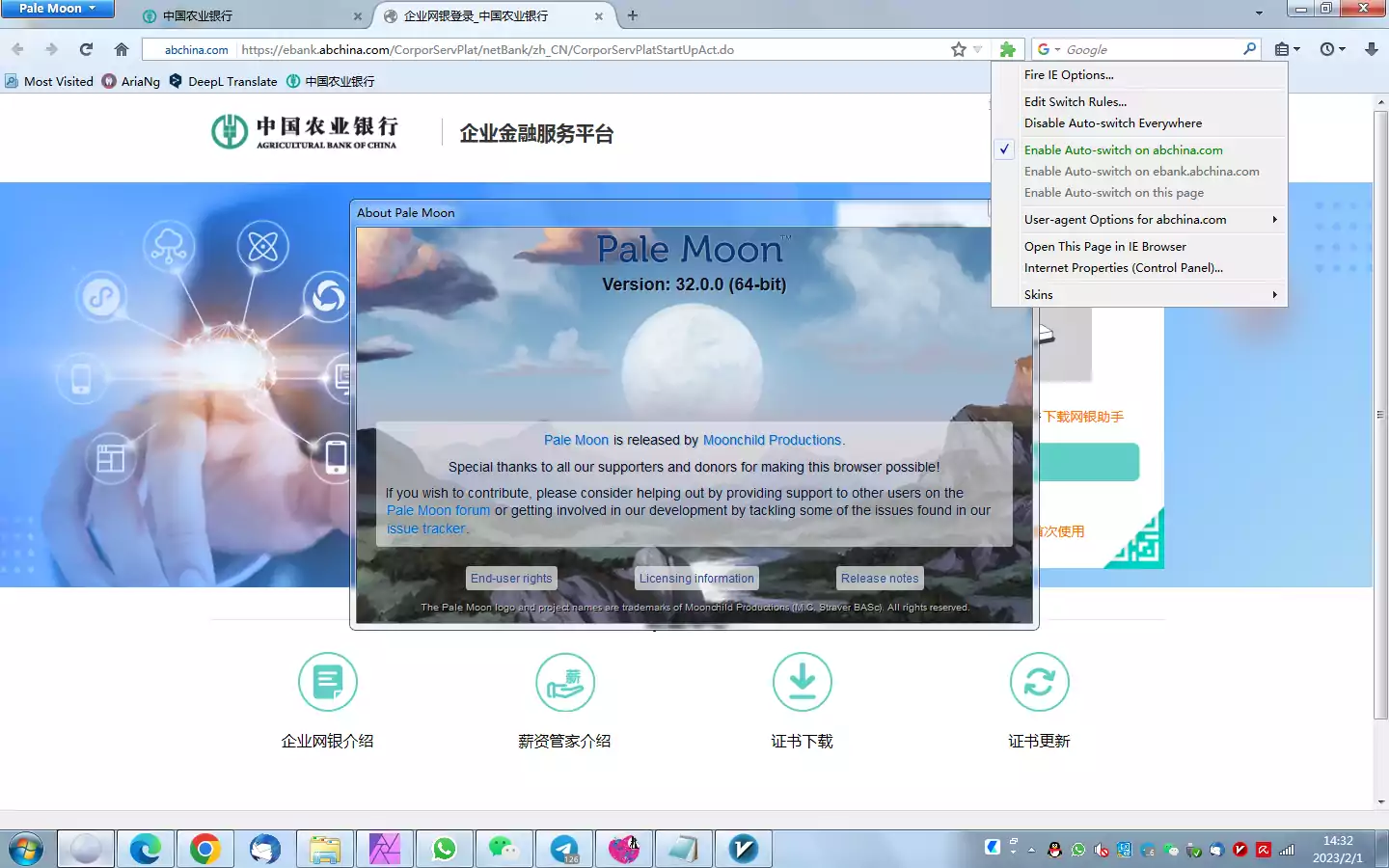
With the Fire IE extension, Pale Moon can use the Internet Explorer rendering engine to display these websites.
Pale Moon is an open-source web browser based on the Goanna rendering engine. It focuses on efficiency, customization, and support for technologies that have been removed from modern Firefox versions.
Because Pale Moon retains compatibility with many legacy Firefox extensions, it can still run add-ons that no longer work in modern Firefox.
One of these extensions is Fire-IE., which is an alternative to IE Tab.
Fire IE was originally designed for older versions of Firefox, up to Firefox 46. However, Pale Moon still supports the legacy extension system, making it possible to use Fire IE as an Internet Explorer integration solution.
At the time of writing, I am using Pale Moon 32.0.0.
Installing Fire IE
You can install the Fire IE extension from its project page:
If you cannot access GitHub, you can also install Fire IE from:
However, some add-on websites may reject Pale Moon because of its user agent.
Fortunately, Pale Moon allows you to override the user agent for individual websites.
How to Change the User Agent in Pale Moon
Step 1: Open about:config
Enter the following address in the Pale Moon address bar:
1
about:config
This will open the advanced preferences page.
Step 2: Create a New String Preference
Right-click anywhere on the page and select:
1
New → String
Enter the following preference name:
1
general.useragent.override.addons.thunderbird.net
Step 3: Set the User Agent
Click OK, then enter the following value:
1
Mozilla/5.0 (Windows NT 10.0; Win64; x64; rv:56.0) Gecko/20100101 Firefox/56.0
Click OK again to save the preference.
Step 4: Install Fire IE
After changing the user agent, revisit the Fire IE download page and install the extension.
Pale Moon’s per-site user agent override feature makes this process relatively straightforward.
Conclusion
Fire IE is designed for older Firefox versions, generally up to Firefox 46. However, because Pale Moon continues to support many legacy Firefox extensions, it can still be used as an alternative way to access websites that require Internet Explorer compatibility.
If you occasionally need to access an old banking website, government portal, enterprise system, or other legacy website that only works properly with Internet Explorer, Pale Moon + Fire IE may be a useful solution.
For users who prefer not to install a dual-engine browser or a modern IE Tab helper application, this setup provides a lightweight alternative that integrates Internet Explorer rendering directly into a Firefox-based browser.
Welcome to our website