
路由器型号
手上有一台外贸公司淘汰下来的 TANTIV4 NSAC1200RZ Netsmart Router,路由器背面只有打印的 “外贸千兆路由器” 字样;一个千兆 wan 口,4个百兆 lan 口,并不是说芯片不支持,而是每个 lan 口只有 4 条接线。与此路由器类似配置的还有华硕 RT-AC1200GU(RT-AC57U),Zbtlink ZBT-WG1602 16M 路由器和友华 YouHua WR1200JS;
这几个路由器芯片都是一样的,TANTIV4 可以刷这几个路由器的 OpenWRT 固件,但是由于电路设计的不同,刷了之后会出现不同的问题。TANTIV4 刷入华硕 RT-AC1200GU 的固件后,Wi-Fi 灯不亮,其他正常; 刷入 Zbtlink ZBT-WG1602 16M 版的固件,网口顺序不对但是可以在后台调整网口,算是将就可用;刷入友华 YouHua WR1200JS 的固件一切正常,唯一区别就是 YouHua WR1200JS 有 USB 口,而这台 TANTIV4 没有 USB 口,拆开看电路板其实是预留了一个 USB 接口的焊盘位置,也许是为了省成本所以没装 USB 模块。

这台 TANTIV4 路由器到我手里就已经刷好了 Breed,所以可以很方便刷各种固件,不担心变砖;需要注意的是,刷机 RESET 按钮不是位于路由器前方,这台路由器设计很奇怪,如果说天线的位置算后边的话,它的网口,电源接口都在前边,电源接口旁边还有个和 RESET 按钮一样的孔,刷好友华 YouHua WR1200JS 的固件后,这个按钮是重置功能,刷机 RESET 按钮位于左边的散热孔里。

懒人版自带插件的 OpenWRT 衍生版: Kwrt
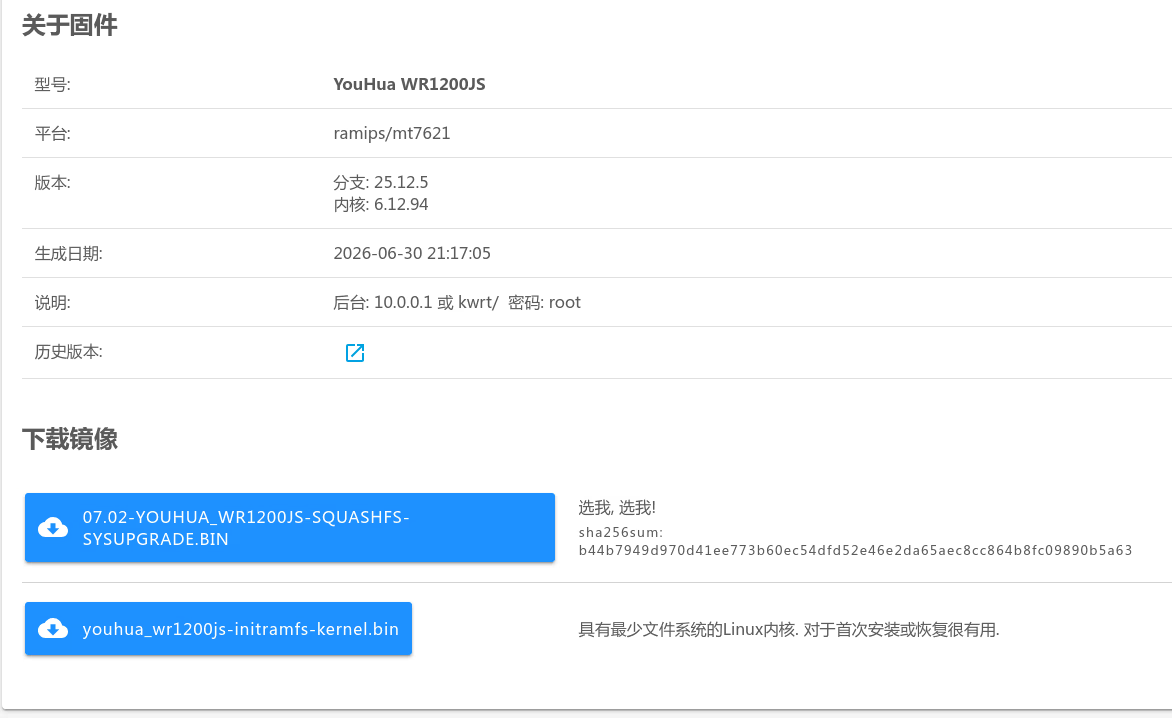
如果当前是基于快照版的,可以去历史版本下载稳定版分支,截至本文发表之前最新版为 分支: 25.12.5;如果有最新的稳定版分支,直接下载 07.02-YOUHUA_WR1200JS-SQUASHFS-SYSUPGRADE.BIN 这样的文件即可。
Kwrt 默认自带 PassWall 插件,但是对于 TANTIV4 这样的配置来说可以用但是很慢,尤其是订阅管理和规则管理页面卡个十几秒都很正常。之前这台路由器跑的是 shadowsocks 协议,用 PassWall 插件跑 Anytls 和 Tuic 协议就有点吃力了,也就是说如果你有这样的路由器,可以旧物再利用。至于要不要购置新路由器就看你的选择了。
进阶版官方 OpenWRT 跑 sing-box 裸核代理
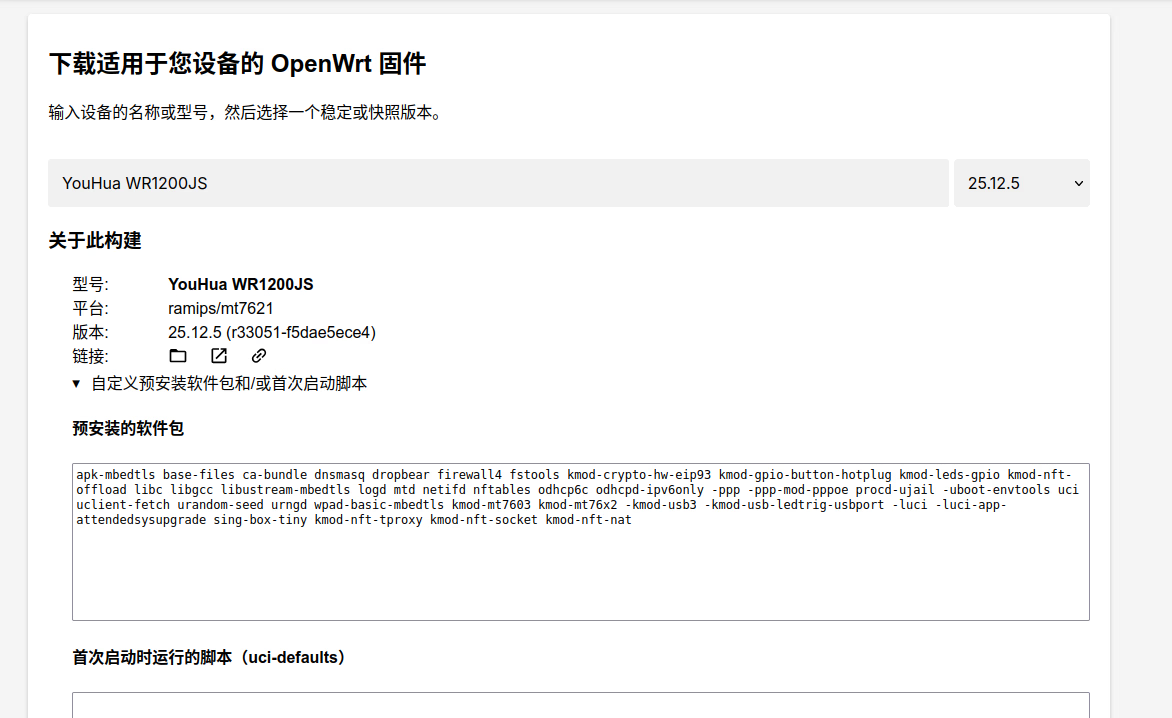
打开 OpenWrt Firmware Selector,输入 YouHua WR1200JS,不要直接下载映像;点开“自定义预安装软件包和/或首次启动脚本”,预安装的软件包填入以下内容。
apk-mbedtls base-files ca-bundle dnsmasq dropbear firewall4 fstools kmod-crypto-hw-eip93 kmod-gpio-button-hotplug kmod-leds-gpio kmod-nft-offload libc libgcc libustream-mbedtls logd mtd netifd nftables odhcp6c odhcpd-ipv6only -ppp -ppp-mod-pppoe procd-ujail -uboot-envtools uci uclient-fetch urandom-seed urngd wpad-basic-mbedtls kmod-mt7603 kmod-mt76x2 -kmod-usb3 -kmod-usb-ledtrig-usbport -luci -luci-app-attendedsysupgrade -luci-base -uhttpd sing-box-tiny -rpcd-mod-luci
然后点击“请求构建”,在线构建可以把 sing-box-tiny 写进只读压缩分区,有足够的空间下载规则文件;同时删除了 luci 界面包,pppoe 拨号相关包(这个配置就不要想光猫桥接了),USB 模块包,留着 luci 界面包也是可以的,会多占用大概 500kb 的空间。无 luci 界面配置路由器参考这篇文章 OpenWRT 25.12 命令行完整配置指南。
为什么要使用在线构建可以把 sing-box-tiny 写进只读压缩分区?直接下载原版映像,空间不够安装 sing-box 包,更没有空间下载额外的规则文件。
sing-box 配置科学上网代理
ssh 进路由器后台,编辑 sing-box 配置文件。
vi /etc/sing-box/config.json
复制粘贴以下内容。
{
  "log": {
    "disabled": true,
    "level": "info",
    "timestamp": false
  },
  "dns": {
    "servers": [
      {
        "tag": "dns-direct",
        "type": "udp",
        "server": "192.168.1.1",
        "server_port": 53
      },
      {
        "type": "h3",
        "tag": "dns-remote",
        "server": "1.1.1.1",
        "server_port": 443,
        "path": "/dns-query",
        "tls": {
          "enabled": true,
          "server_name": "cloudflare-dns.com"
        },
        "domain_resolver": {
          "server": "dns-direct"
        },
        "detour": "proxy"
      }
    ],
    "rules": [
      {
        "domain_suffix": [
          "addons.mozilla.org",
          "analytics.google.com",
          "onedrive.live.com",
          "primevideo.com",
          "steamcommunity.com",
          "tpc.googlesyndication.com"
        ],
        "server": "dns-remote"
      },
      {
        "domain_suffix": [
          "accuweather.com",
          "aviationweather.gov",
          "edu.kg",
          "google.cn",
          "hdcdn.online",
          "localsend.org",
          "made-in-china.com",
          "micstatic.com",
          "meixi-mgo.com",
          "met.no",
          "openweathermap.org",
          "rustdesk.com",
          "tigress.cc",
          "vis.ee",
          "xzmgo.com",
          "bjxuejing.cn",
          "wanyiwan.top"
        ],
        "domain_keyword": [
          "byte",
          "douyin",
          "ecombd"
        ],
        "server": "dns-direct"
      },
      {
        "rule_set": ["geosite-category-ads"],
        "action": "reject"
      },
      {
        "domain_keyword": ["gdtimg", "pangolin", "pglstatp"],
        "domain_suffix": [
          "ad.10010.com",
          "ads.cup.com.cn",
          "boot.biz.weibo.com",
          "bootpreload.uve.weibo.com",
          "bootrealtime.uve.weibo.com",
          "brandvideo.biz.weibo.com",
          "dsp-ad.yy.com",
          "e.qq.com",
          "gdt.qq.com",
          "splash.yy.com"
        ],
        "server": "reject"
      },
      {
        "rule_set": [
          "geosite-google-cn"
        ],
        "server": "dns-direct"
      },
      {
        "rule_set": [
          "geosite-google",
          "geosite-github",
          "geosite-meta"
        ],
        "server": "dns-remote"
      },
      {
        "rule_set": [
          "geosite-anthropic",
          "geosite-linkedin",
          "geosite-tiktok"
        ],
        "server": "dns-remote",
        "strategy": "ipv4_only"
      },
      {
        "rule_set": [
          "geosite-cn",
          "geosite-amazon",
          "geosite-apple",
          "geosite-microsoft",
          "geosite-mozilla",
          "geosite-category-cdn-!cn",
          "geosite-category-ru"
        ],
        "server": "dns-direct"
      }
    ],
    "strategy": "prefer_ipv6",
    "disable_cache": false,
    "disable_expire": false,
    "cache_capacity": 1000,
    "final": "dns-remote"
  },
  "inbounds": [
    {
      "type": "tun",
      "tag": "tun-in",
      "address": [
        "172.19.0.1/30",
        "fdfe:dcba:9876::1/126"
      ],
      "mtu": 1500,
      "auto_route": true,
      "auto_redirect": true,
      "strict_route": true,
      "stack": "system",
      "sniff": true,
      "route_exclude_address": [
        "127.0.0.0/8",
        "::1/128",
        "fe80::/10"
      ],
      "exclude_interface": [
        "wan"
      ]
    }
  ],
  "outbounds": [
    {
      "type": "direct",
      "tag": "direct-out"
    },
    {
      "type": "anytls",
      "tag": "proxy",
      "server": "服务器ip",
      "server_port": 端口,
      "password": "uuid",
      "idle_session_check_interval": "30s",
      "idle_session_timeout": "30s",
      "min_idle_session": 0,
      "domain_resolver": "dns-direct",
      "tls": {
        "enabled": true,
        "server_name": "域名",
        "insecure": true
      }
    }
  ],
  "route": {
    "auto_detect_interface": false,
    "default_interface": "wan",
    "default_domain_resolver": "dns-direct",
    "rules": [
      {
        "action": "sniff"
      },
      {
        "protocol": "dns",
        "action": "hijack-dns"
      },
      {
        "domain_suffix": [
          "addons.mozilla.org",
          "analytics.google.com",
          "onedrive.live.com",
          "primevideo.com",
          "steamcommunity.com",
          "tpc.googlesyndication.com"
        ],
        "outbound": "proxy"
      },
      {
        "domain_suffix": [
          "accuweather.com",
          "aviationweather.gov",
          "edu.kg",
          "google.cn",
          "hdcdn.online",
          "localsend.org",
          "made-in-china.com",
          "micstatic.com",
          "meixi-mgo.com",
          "met.no",
          "openweathermap.org",
          "rustdesk.com",
          "tigress.cc",
          "vis.ee",
          "xzmgo.com",
          "bjxuejing.cn",
          "wanyiwan.top"
        ],
        "domain_keyword": [
          "byte",
          "douyin",
          "ecombd"
        ],
        "outbound": "direct-out"
      },
      {
        "rule_set": ["geosite-category-ads"],
        "action": "reject"
      },
      {
        "domain_keyword": [
          "gdtimg",
          "pangolin",
          "pglstatp"
        ],
        "domain_suffix": [
          "ad.10010.com",
          "ads.cup.com.cn",
          "boot.biz.weibo.com",
          "bootpreload.uve.weibo.com",
          "bootrealtime.uve.weibo.com",
          "brandvideo.biz.weibo.com",
          "dsp-ad.yy.com",
          "e.qq.com",
          "gdt.qq.com",
          "smartad.10010.com",
          "splash.yy.com"
        ],
        "action": "reject"
      },
      {
        "rule_set": [
          "geosite-google-cn"
        ],
        "outbound": "direct-out"
      },
      {
        "rule_set": [
          "geosite-github",
          "geosite-google",
          "geosite-linkedin",
          "geosite-meta",
          "geosite-tiktok"
        ],
        "outbound": "proxy"
      },
      {
        "rule_set": [
          "geosite-cn",
          "geosite-amazon",
          "geosite-apple",
          "geosite-microsoft",
          "geosite-mozilla",
          "geosite-category-cdn-!cn",
          "geosite-category-games",
          "geosite-category-ru"
        ],
        "outbound": "direct-out"
      },
      {
        "ip_is_private": true,
        "outbound": "direct-out"
      },
      {
        "rule_set": ["geoip-cn", "geoip-hk", "geoip-private"],
        "outbound": "direct-out"
      },
      {
        "ip_cidr": [
          "8.219.1.15/32",
          "47.245.124.74/32"
        ],
        "outbound": "direct-out"
      }
    ],
    "rule_set": [
      {"tag": "geosite-github", "type": "local", "format": "binary", "path": "/etc/sing-box/geosite-github.srs"},
      {"tag": "geosite-google", "type": "local", "format": "binary", "path": "/etc/sing-box/geosite-google.srs"},
      {"tag": "geosite-google-cn", "type": "local", "format": "binary", "path": "/etc/sing-box/geosite-google-cn.srs"},
      {"tag": "geosite-linkedin", "type": "local", "format": "binary", "path": "/etc/sing-box/geosite-linkedin.srs"},
      {"tag": "geosite-meta", "type": "local", "format": "binary", "path": "/etc/sing-box/geosite-meta.srs"},
      {"tag": "geosite-tiktok", "type": "local", "format": "binary", "path": "/etc/sing-box/geosite-tiktok.srs"},
      {"tag": "geosite-cn", "type": "local", "format": "binary", "path": "/etc/sing-box/geosite-cn.srs"},
      {"tag": "geosite-amazon", "type": "local", "format": "binary", "path": "/etc/sing-box/geosite-amazon.srs"},
      {"tag": "geosite-anthropic", "type": "local", "format": "binary", "path": "/etc/sing-box/geosite-anthropic.srs"},
      {"tag": "geosite-apple", "type": "local", "format": "binary", "path": "/etc/sing-box/geosite-apple.srs"},
      {"tag": "geosite-microsoft", "type": "local", "format": "binary", "path": "/etc/sing-box/geosite-microsoft.srs"},
      {"tag": "geosite-mozilla", "type": "local", "format": "binary", "path": "/etc/sing-box/geosite-mozilla.srs"},
      {"tag": "geosite-category-ru", "type": "local", "format": "binary", "path": "/etc/sing-box/geosite-category-ru.srs"},
      {"tag": "geosite-category-ads", "type": "local", "format": "binary", "path": "/etc/sing-box/geosite-category-ads.srs"},
      {"tag": "geosite-category-cdn-!cn", "type": "local", "format": "binary", "path": "/etc/sing-box/geosite-category-cdn-!cn.srs"},
      {"tag": "geosite-category-games", "type": "local", "format": "binary", "path": "/etc/sing-box/geosite-category-games.srs"},
      {"tag": "geoip-cn", "type": "local", "format": "binary", "path": "/etc/sing-box/geoip-cn.srs"},
      {"tag": "geoip-hk", "type": "local", "format": "binary", "path": "/etc/sing-box/geoip-hk.srs"},
      {"tag": "geoip-private", "type": "local", "format": "binary", "path": "/etc/sing-box/geoip-private.srs"}
    ],
    "final": "proxy"
  }
}
这里使用的是 Anytls 模板,需要使用其他类型节点,请自行配置。国内网站直连,DNS 使用光猫的 192.168.1.1,国外网站走代理,解析用的是 cloudflare 的 h3 DNS。默认上网接口是 wan 口,如果需要旁路由模式,”auto_detect_interface”: false, 把这个选项改为 true,删掉这一行 “default_interface”: “wan”,或者手动指定 default_interface 为 lan1 等其他口。
规则文件下载
首先确保当前目录是 /etc/sing-box/
cd /etc/sing-box/
然后使用以下命令下载需要的规则文件
for name in 'category-cdn-!cn' amazon anthropic apple category-ads category-games category-ru cn github google google-cn linkedin meta microsoft mozilla tiktok; do
    wget -O "geosite-$name.srs" "https://raw.githubusercontent.com/SagerNet/sing-geosite/rule-set/geosite-$name.srs"
done
以上内容是从 sing-box 官方仓库下载的规则文件,geosite-cn.srs 大概有 50kb 左右。这里建议以上命令中去掉 cn 这个文件,下载增强版的规则文件。
下载增强版 geosite-cn 文件
增强版 geosite-cn 文件大概有500kb。
wget https://raw.githubusercontent.com/lyc8503/sing-box-rules/refs/heads/rule-set-geosite/geosite-cn.srs
下载 geoip 文件
for file in geoip-cn.srs geoip-hk.srs geoip-private.srs; do wget "https://raw.githubusercontent.com/lyc8503/sing-box-rules/refs/heads/rule-set-geoip/$file"; done
或者直接从 lyc8503 仓库下载所有规则文件
下载 geosite 文件
for name in 'category-cdn-!cn' amazon anthropic apple category-ads category-games category-ru cn github google google-cn linkedin meta microsoft mozilla tiktok; do
    wget -O "geosite-$name.srs" "https://raw.githubusercontent.com/lyc8503/sing-box-rules/refs/heads/rule-set-geosite/geosite-$name.srs"
done
下载 geoip 文件
for name in cn hk private; do
    wget -O "geoip-$name.srs" "https://raw.githubusercontent.com/lyc8503/sing-box-rules/refs/heads/rule-set-geoip/geoip-$name.srs"
done
如果说因为网络原因路由器无法下载这些文件,电脑有科学网络的情况下,先下载到电脑上然后传到路由器;光猫地址基本都是 192.168.1.1,你的路由器地址要改为 192.168.1.2 等其他地址。
scp -O *.srs [email protected]:/etc/sing-box/
电脑上如果安装了 aria2,那么可以一次性批量下载所有文件
{
  for name in 'category-cdn-!cn' amazon anthropic apple category-ads category-games category-ru cn github google google-cn linkedin meta microsoft mozilla tiktok; do
      echo "https://raw.githubusercontent.com/lyc8503/sing-box-rules/refs/heads/rule-set-geosite/geosite-$name.srs"
      echo "  out=geosite-$name.srs"
  done
  for name in cn hk private; do
      echo "https://raw.githubusercontent.com/lyc8503/sing-box-rules/refs/heads/rule-set-geoip/geoip-$name.srs"
      echo "  out=geoip-$name.srs"
  done
} | aria2c -i - -j 16
检查一下配置文件是否有错误,配置正确没有任何输出,如果输出错误,请自行 Google 或者问 ai。
sing-box check -c /etc/sing-box/config.json
编辑脚本文件
写完配置文件不要急着启动 sing-box,OpenWRT 源自带的启动脚本有问题,编辑以下文件更换为官方的脚本。
cat /etc/config/sing-box
config main 'main'
    option enabled '0'          ← 这里是 0,就是问题所在
    option conffile '/etc/sing-box/config.json'
    option workdir '/usr/share/sing-box'
修复方法,执行一行命令:
uci set sing-box.main.enabled=1 && uci commit sing-box
备份旧脚本(也可以不备份,直接写入官方版本)
cp /etc/init.d/sing-box /etc/init.d/sing-box.bak
写入官方版本(内容来自 SagerNet 官方仓库)
cat > /etc/init.d/sing-box << 'EOF'
#!/bin/sh /etc/rc.common

USE_PROCD=1
START=99
PROG="/usr/bin/sing-box"

start_service() {
    config_load "sing-box"

    local enabled config_file working_directory
    local log_stderr
    config_get_bool enabled "main" "enabled" "0"
    [ "$enabled" -eq "1" ] || return 0

    config_get config_file "main" "conffile" "/etc/sing-box/config.json"
    config_get working_directory "main" "workdir" "/usr/share/sing-box"
    config_get_bool log_stderr "main" "log_stderr" "1"

    procd_open_instance
    procd_set_param command "$PROG" run -c "$config_file" -D "$working_directory"
    procd_set_param file "$config_file"
    procd_set_param stderr "$log_stderr"
    procd_set_param limits core="unlimited"
    procd_set_param limits nofile="1000000 1000000"
    procd_set_param respawn

    procd_close_instance
}
EOF
chmod +x /etc/init.d/sing-box
最后启动 sing-box 内核,电脑打开浏览器测试。
/etc/init.d/sing-box restart
升级保留配置
OpenWRT 升级保留配置默认不包括自定义脚本,可以编辑如下文件:
vi /etc/sysupgrade.conf
## This file contains files and directories that should
## be preserved during an upgrade.
## 该文件包含在升级过程中应予以保留的文件和目录

# /etc/example.conf
# /etc/openvpn/
/etc/init.d/sing-box
如上在文件末尾添加一行:/etc/init.d/sing-box 即可。
OpenWRT 后台优化
选择 网络》防火墙,开启 Hardware flow offloading ▾;如果你的网络支持 ipv6,那么可以在接口》分别修改 lan 口和 wan6 口为 ipv6 中继模式。以上配置为 Tun 模式,配置简单,已经可以满足大部分需求,Youtube 1080p 视频也可以正常观看。没有更高的要求,配置到这里就完成了。