法定节假日调休补班
https://yangh9.github.io/ChinaCalendar/cal_holiday.ics
农历、天干地支
https://yangh9.github.io/ChinaCalendar/cal_lunar.ics
其他日历
中华人民共和国节日、纪念日、法定节假日调休补班、二十四节气、天干地支农历日历
Chinese-Lunar-Calendar-ics
https://lwlsw.github.io/Chinese-Lunar-Calendar-ics/chinese_lunar_my.ics
不包含法定节假日
| 一般性节日 | 订阅链接 | 如重阳节、圣诞节等(不包含法定节假日) |
| 其他节日 | 订阅链接 | 如地球日、护士节等 |
为 GNOME Calendar 添加农历方法
打开 GNOME Calendar,点击日历>管理日历
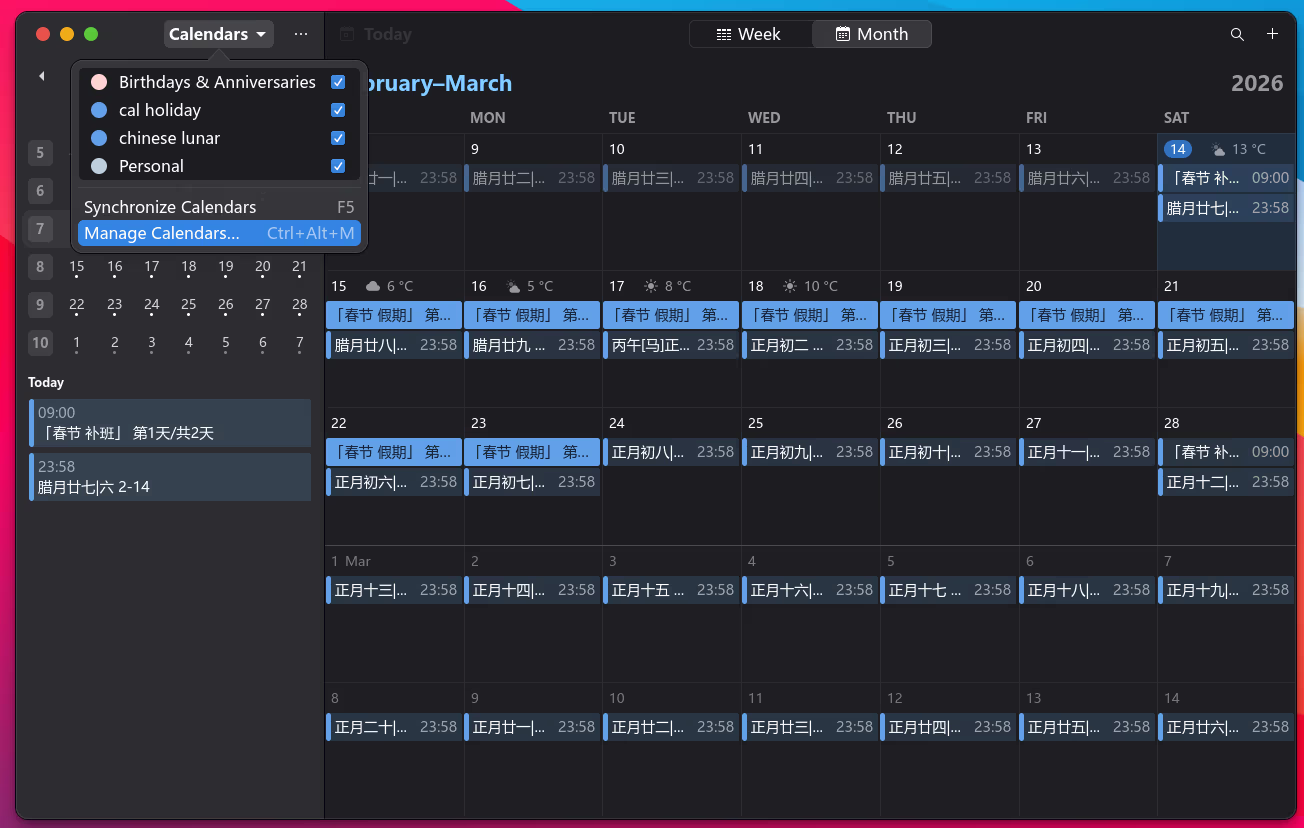
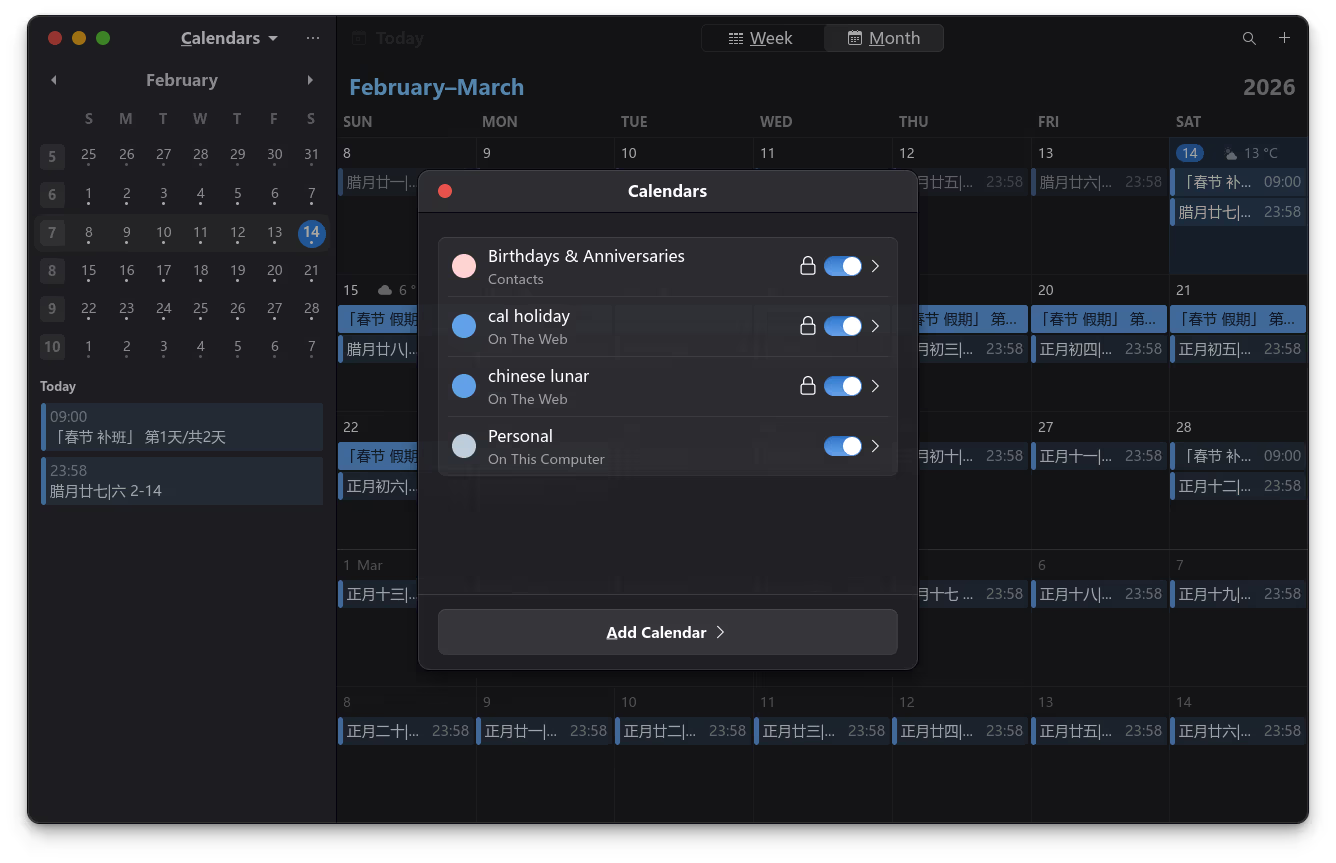
点击添加日历
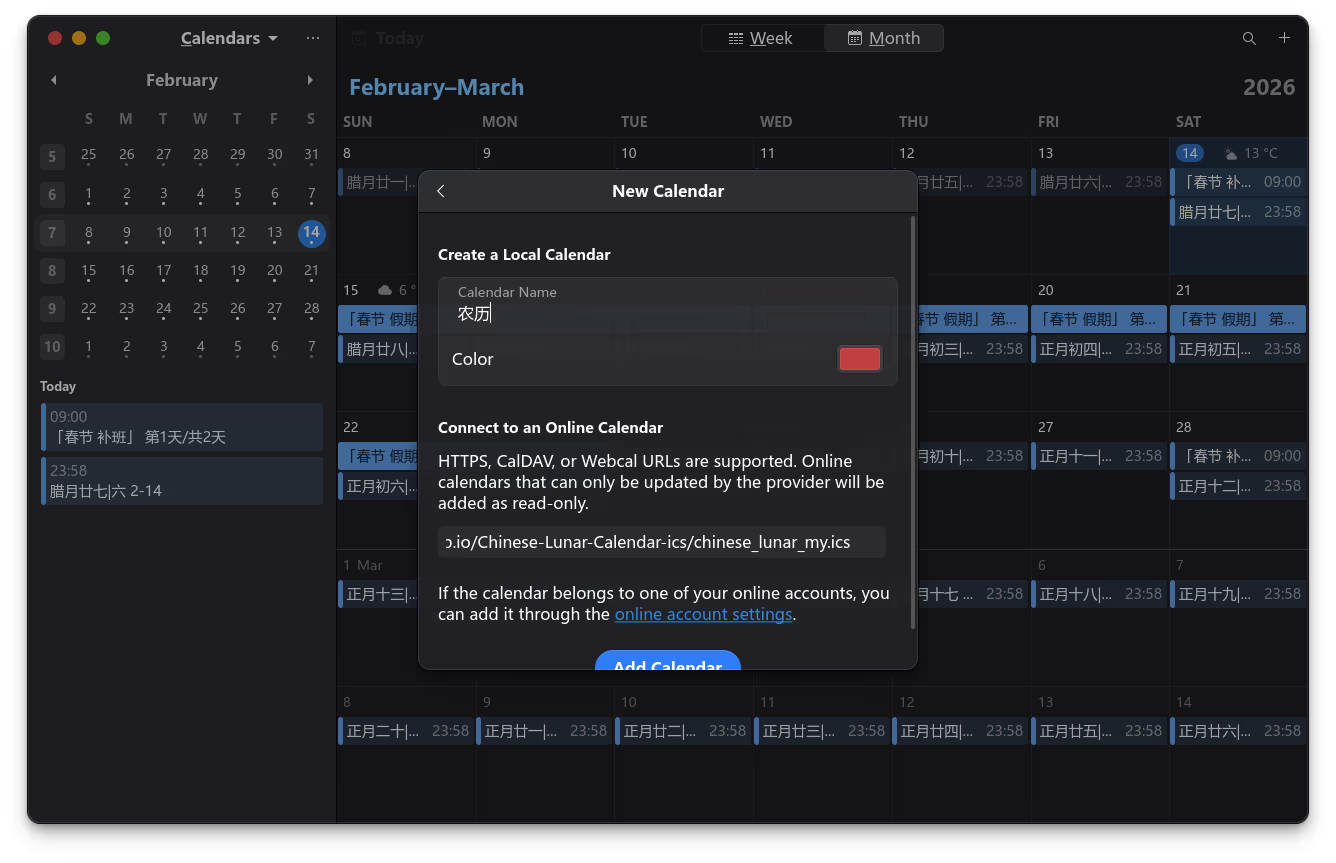
日历名称随便填写一个名字,复制上边的日历地址,粘贴到地址栏,最后点击添加日历
为 GNOME Calendar 添加天气预报
打开 Get the Weather Forecast with Icons in your Calendar,输入城市拼音,例如 beijing;复制 webcal 链接,参考农历添加方法添加天气预报链接即可。
为 GNOME Weather 添加任意城市(位置)
去这个项目 add-location-to-gnome-weather.sh 下载 add-location-to-gnome-weather.sh
#!/bin/bash
# Add location to gnome weather manually

if [[ ! -z "$(which gnome-weather)" ]]; then
	system=1
fi

if [[ ! -z "$(flatpak list | grep org.gnome.Weather)" ]]; then
	flatpak=1
fi

if [[ ! $system == 1 && ! $flatpak == 1 ]]; then
	echo "GNOME Weather isn't installed"
	exit
fi

if [[ ! -z "$*" ]]; then
	query="$*"
else
	read -p "Type the name of the location you want to add to GNOME Weather: " query
fi

query="$(echo $query | sed 's/ /+/g')"

request=$(curl "https://nominatim.openstreetmap.org/search?q=$query&format=json&limit=1" -s)

if [[ $request == "[]" ]]; then
	echo "No locations found, consider removing some search terms"
	exit
fi

read -p "If this is not the location you wanted, consider adding search terms
Are you sure you want to add $(echo $request | sed 's/.*"display_name":"//' | sed 's/".*//')? [y/n] : " answer

if [[ ! $answer == "y" ]]; then
	echo "Not adding location"
	exit
else
	echo "Adding location"
fi

id=$(echo $request | sed 's/.*"place_id"://' | sed 's/,.*//')

name=$(curl "https://nominatim.openstreetmap.org/details.php?place_id=$id&format=json" -s | sed 's/.*"name": "//' | sed 's/".*//')

lat=$(echo $request | sed 's/.*"lat":"//' | sed 's/".*//')
lat=$(echo "$lat / (180 / 3.141592654)" | bc -l)

lon=$(echo $request | sed 's/.*"lon":"//' | sed 's/".*//')
lon=$(echo "$lon / (180 / 3.141592654)" | bc -l)

if [[ $system == 1 ]]; then
	locations=$(gsettings get org.gnome.Weather locations)
fi

if [[ $flatpak == 1 ]]; then
	locations=$(flatpak run --command=gsettings org.gnome.Weather get org.gnome.Weather locations)
fi

location="<(uint32 2, <('$name', '', false, [($lat, $lon)], @a(dd) [])>)>"

if [[ $system == 1 ]]; then
	if [[ ! $(gsettings get org.gnome.Weather locations) == "@av []" ]]; then
		gsettings set org.gnome.Weather locations "$(echo $locations | sed "s|>]|>, $location]|")"
	else
		gsettings set org.gnome.Weather locations "[$location]"
	fi
fi

if [[ $flatpak == 1 ]]; then
	if [[ ! $(flatpak run --command=gsettings org.gnome.Weather get org.gnome.Weather locations) == "@av []" ]]; then
		flatpak run --command=gsettings org.gnome.Weather set org.gnome.Weather locations "$(echo $locations | sed "s|>]|>, $location]|")"
	else
		flatpak run --command=gsettings org.gnome.Weather set org.gnome.Weather locations "[$location]"
	fi
fi
赋予执行权限
chmod +x add-location-to-gnome-weather.sh
添加城市
./add-location-to-gnome-weather.sh
假设你想添加北京,输入 Beijing;假设你想添加保定,输入 Baoding。